
HR
HR software for consulting firms
Everything about your employees in one place: who they are, their documents, reviews, time off and skills, and what happens when someone joins or leaves. Seen only by the users who should see it.
Works on its own. Timesheet is free for everyone.
EUR 9.99 per user with access, per month
Employee records in one place
The details you otherwise look for in emails, folders and spreadsheets, on one page per employee.
Profile and employment
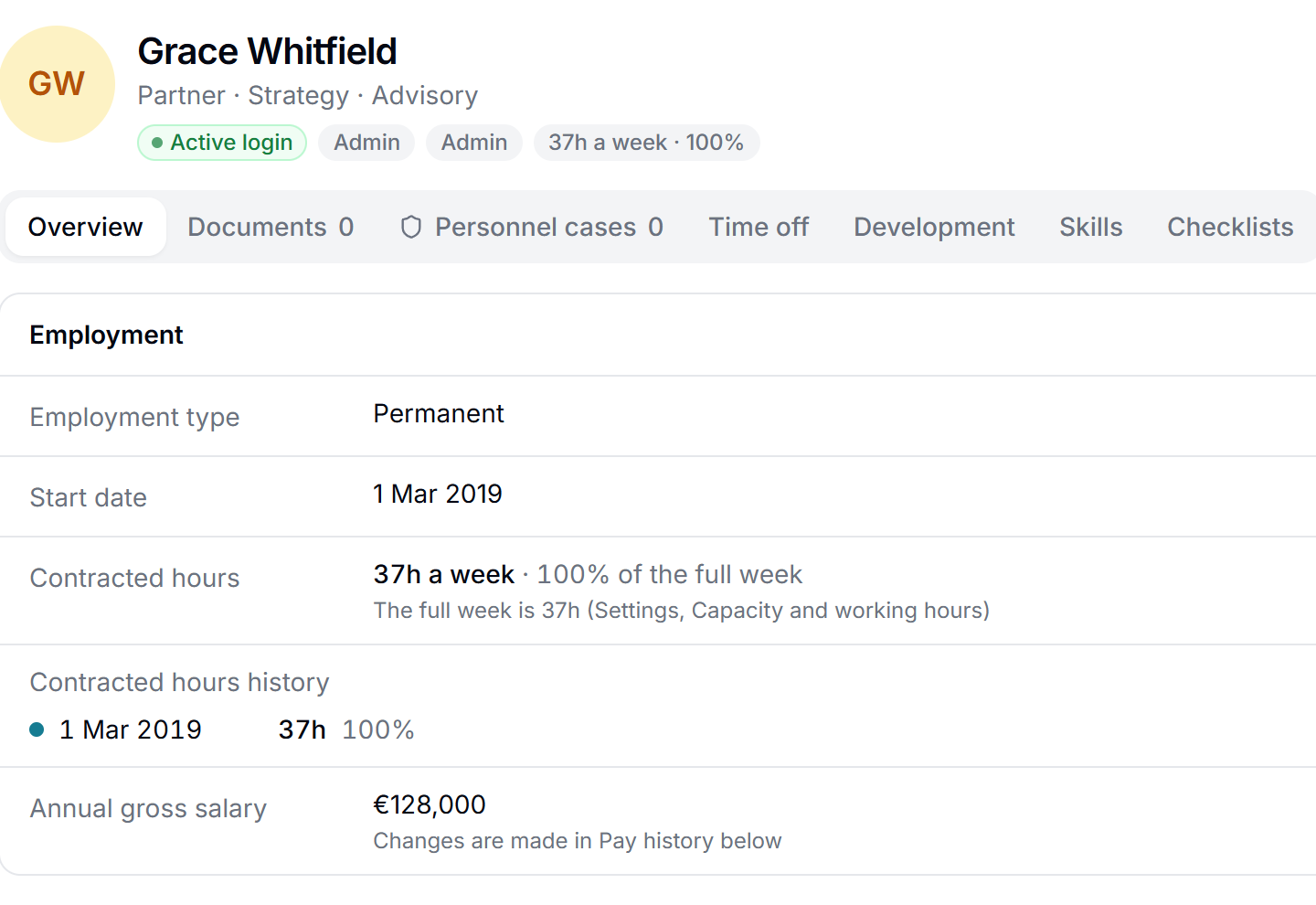
Name, job title, start date, working hours and an emergency contact. When the working hours change, the old ones are kept, so you can always see what applied when.
Work schedules that rotate
Each employee's weekly schedule, with hours per day, also schedules that rotate over 1 to 8 weeks. A new schedule applies from a chosen date and never changes earlier weeks.
National ID kept encrypted
The national ID is stored encrypted, so only the users who need it can read it.
Teams and departments
Who belongs where, so lists, approvals and overviews can be split by team.
Org chart and line manager
See who reports to whom, drawn as a chart. Each employee can have a line manager. Turn it on if you want it.
Export the employee list
Download the list as CSV or XLSX, for example for your accountant, insurer or payroll bureau.
Salary development
Salary for each employee and team as a table and a chart with the whole history. Each change gets a reason from a list you edit. With Costs and rates
A reminder before the salary review
Matrix reminds HR in good time before the next salary review: one date for the firm, a date per employee, or both. With Costs and rates
Make it yours
Employment types, document types, categories for cases, job titles as a fixed list and your own fields on the employee.
Confidential documents and personnel cases
Contracts, agreements and cases sit on the employee, and only the right users can see them.
Documents encrypted in the browser
Contracts, addenda and other papers are stored on the employee. They are encrypted in the browser before they are sent, and each has a confidentiality level that controls who can open it.
Personnel cases
Conversations, warnings and other cases are noted on the employee in confidence. Every time someone opens a case, it is logged.
Employees see who has looked
An employee can see who opened their confidential documents and cases, and when. Turn it on for the whole firm.
Signatures on HR documents
Send a contract or an addendum for signature from Matrix, with the same e-signature used for proposals.
Requests to HR
Employees send questions and cases to HR in one place instead of by email. Each request has a status, so the employee can see it is being handled.
A whistleblowing channel
A separate, confidential channel to report serious matters, also anonymously. The reporter gets a receipt and can follow the case, and only the users you choose see the reports. People without a login, such as former employees and suppliers, can report on a public page and follow the case with a code.
Development reviews with goals that are followed up
The important conversations are written down in one place, and what you agree on is followed up.
Development reviews
Your own questionnaire for the yearly review, in your own language, which employee and manager can prepare separately. At the next review, last year's answers and agreements are at the top.
Agreed goals that are followed up
What you agree on becomes goals that are specific, measurable and have a deadline, each with an employee responsible. Matrix reminds them of the deadlines and shows what is done and what is not. For example: get a project management certificate by 1 June.
Exit interviews
When someone leaves, your own questionnaire is filled in. You decide which answers are flagged for HR.
A warning when the same reason comes back
When several employees who leave name the same problem, HR is told. Patterns show only when there are enough answers that no single employee can be recognised: at least 5 by default, and you can change the number.
Your own questions
Matrix comes with no ready-made questions. You write the questions for both reviews and exit interviews, in your own language.
Time off and vacation without emails back and forth
From asking for time off to knowing how many days are left.
Ask for time off, the manager approves
The employee asks for time off, and the line manager approves or rejects it, or HR when there is no manager. The manager sees who else in the team is away on the same days.
Balances for each kind of time off
Vacation, time off in lieu and other types, each with its own balance. Days are earned as you go, and unused days carry over by your rules.
The balance on a future date
Choose a date ahead and see the balance that day, with planned time off taken off. For example: do I have enough days for three weeks off in July?
Time off policies
Each time off type gets a policy HR sets up: how time off is earned (a fixed number, per month, a percentage of hours or X per Y days), rounding, carry-over, when the year closes, a limit for a negative balance and whether holidays are deducted. A policy applies from the date an employee is put on it.
Vacation on the employee
Vacation is registered on the employee with a balance.
Skills, certificates and key persons
What can employees do, and what are they certified for? So nobody has to ask around when a project needs staffing.
Skills on the employee
Skills with a level, languages and education. Skills are set here and are the same everywhere in Matrix.
Certificates with expiry dates
Certificates are saved with the date they expire, so you see in time who needs to renew.
Search by skill
Find the right employees from what they can do. For example: Python at level 3 with a valid certificate.
Key persons
Matrix tells you when an important skill or certificate is held by only one employee. HR picks the critical skills and how many must have them. For example: at least two must be able to do the payroll audit, and right now only Anne can.
A reminder before a certificate expires
The right users get a reminder in Matrix before a certificate runs out.
A task to renew it
Create a task to renew a certificate before it expires. With Project management
Personality profile
The employee takes the Enneagram test in Matrix, made by a trained Enneagram specialist. The result is kept confidential on the employee, so manager and employee understand how each works and collaborates best.
When someone starts, stops or works too much
A fixed list for every start and stop, and a warning in time when someone carries too much for too long.
Checklists for starting and leaving
A fixed list of what has to happen when someone starts, such as a computer, access and a contract, or leaves, such as handover and closing access. You make the lists yourselves.
Former employees
Set an end date. The employee moves to former employees, their data stays, and they do not need a paid login.
A warning about lasting high load
The manager is told when someone has had a lot of overtime or very high load for a long time, or has not taken vacation for a while. You set the rules, and it is off until you add one. For example: more than 45 hours a week for 6 weeks in a row.
Overtime against the schedule
The wellbeing rules can also look at overtime against each employee's own weekly schedule. With Standard hours
From first day to last day in four steps
Add the employee
The record, the working hours, the schedule and the contract, encrypted on the employee.
Start them well
The start checklist makes sure the computer, access and contract are ready.
Follow up
Development reviews with goals, time off with approval and skills that are kept up to date.
Close the employment
Set the end date, hold the exit interview and work through the leaving checklist.
What HR software does for a consulting firm
HR software keeps everything about your employees in one place: who they are, their documents, reviews, time off and skills, and what happens when someone joins or leaves.
In a consulting firm the same employees are what you sell, so their skills, certificates and time off matter to every project. Matrix keeps them in one record, encrypted where it is sensitive and seen only by the users who should see it.
Use it on its own, or with the rest of Matrix
HR works without any other paid part. Combined with other parts it does more:
- Salary history, and a reminder before each salary reviewWith Costs and rates
- Overtime against each employee's own schedule in the wellbeing rulesWith Standard hours
- A task to renew a certificate before it expiresWith Project management
Pricing
EUR 9.99 per user with access, per month. The employee list and teams are free in every workspace; the rest of HR is paid for the users who use it. Former employees need no login. Try it free for 7 days.
See full pricingQuestions about HR in Matrix
Software that keeps employee records, documents, reviews, time off and skills in one place. In a consulting firm skills and certificates also decide who can be put on a project, so they belong in the same record.
Documents are encrypted in the browser before they are sent, the national ID is stored encrypted, and each document has a confidentiality level. Every time someone opens a confidential case, it is logged, and if the firm turns it on, employees can see who has looked.
Yes. The employee asks, and the line manager approves or rejects, or HR when there is no manager. The manager sees who else in the team is away on the same days.
Yes. What you agree on becomes goals with an employee responsible and a deadline, and Matrix reminds them before the deadline. At the next review, last year's answers are at the top.
Yes. A separate, confidential channel where people can report serious matters, also anonymously and also without a login, and follow the case with a code. Only the users you choose see the reports.
No. Matrix HR does not run payroll or benefits, because the rules differ in every country. The free Timesheet hands payroll a locked payroll period instead.
Yes. HR works on its own. The employee list and teams are free in every workspace, and Timesheet is free for everyone.
EUR 9.99 per user with access, per month. You pay only for the users who use HR, and former employees need no login. Storage for files beyond a fixed amount can cost extra. You can try it free for 7 days.
Bring your employees into Matrix
Start with the free Timesheet, then try HR for 7 days.
Free. No card needed.