
Project management
Project management software for consulting firms
Plan the work, follow every project, send the invoices and see when the money comes in. One module for the whole engagement, from the first task to the last payment.
Works on its own. Timesheet is free for everyone.
EUR 9.99 per user with access, per month
Every project and its plan in one place
See all projects at once, open one and find its progress, team, documents and status on a single page. Share the status with the customer through a link.
Portfolio views
All projects as a table, cards, a board or a timeline, with filters and an archive for finished work.
Project documents
Upload files, preview them without downloading, give them a type, search and rename them.
Status link for the customer
Share a link where the customer sees the project status without logging in or changing anything.

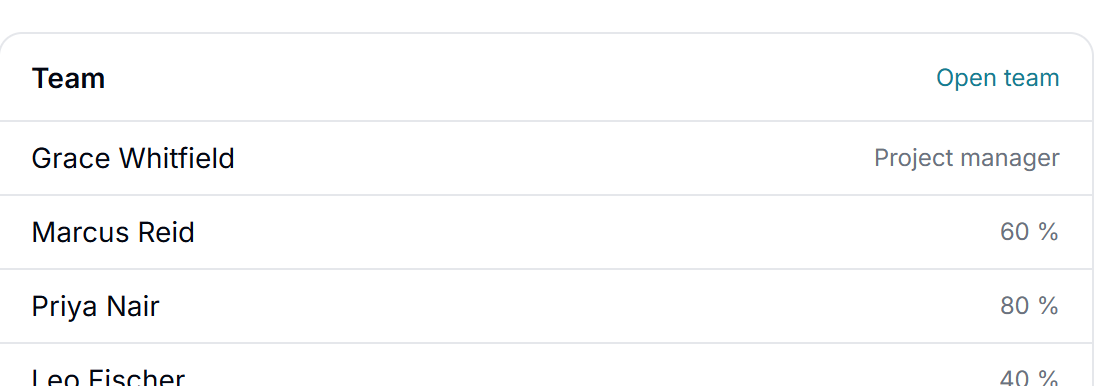
Closing at the end date
When the end date is reached, the project manager confirms the project is done or reopens it with a new date.
Budget, forecast and margin
Fixed price or time and materials, a forecast of the final result and the margin, each number explained. With Costs and rates
Phases and milestones
Split a project into phases with their own dates, and set milestones on the project.
Templates and copy project
Start a new project from a template or from an earlier project.
Hour budgets with warnings
A budget in hours, a warning at the limits you choose and the date the budget runs out at today's pace.
Work outside the plan
Time on new tasks after the plan is locked is collected in one place, as a basis for a change request.
Tasks, timeline and dependencies
Break the work into tasks, give each one the employees who do it and see the same tasks as a list, a board or a timeline.
List, board and timeline
The same tasks as a list, as cards on a board or as bars on a timeline.
Dependencies
Mark that a task waits for or blocks another. It shows on the timeline.
Several assignees, each with an estimate
A task can have several employees, each with their own estimate, including external people such as a subcontractor.
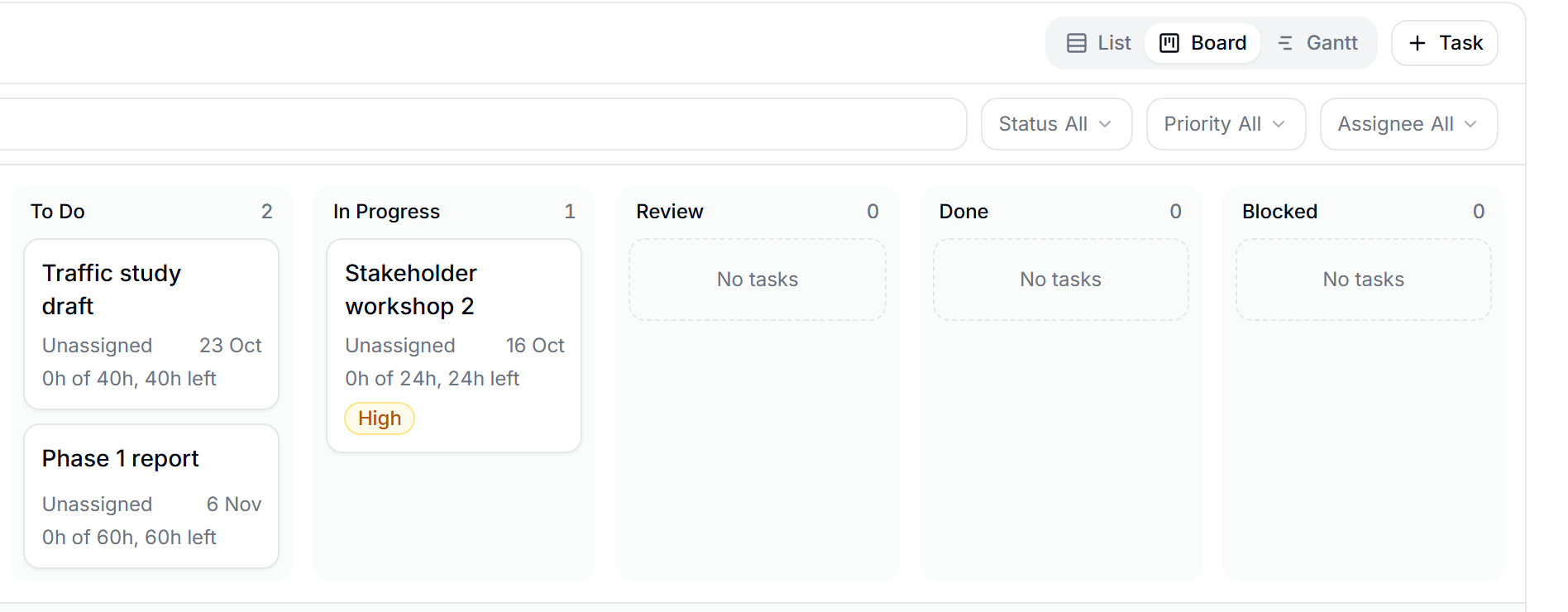
Estimate against time spent
With time registered on tasks, each task shows its estimate, the time spent and what is left.
Recurring tasks
Daily, weekly, monthly or yearly.
Comments, @mentions and files
Write on the task, mention colleagues with @ and attach files.
Subtasks and checklists
Split the work into smaller steps and tick them off.
Ripple effect of a moved task
Move a task and see which tasks and milestones move with it before you decide.
My tasks
One page with your tasks across projects, split into today, this week and later.
Project invoicing built on a billing plan
Plan when each project is invoiced, approve the invoices before they go out and let the reminders follow up on what is not paid.
Billing plan
Invoice on milestones or at fixed intervals, for example 30 percent at start and 70 percent at delivery, or every month.
Approval in several steps
An invoice can need approval from one or more users before it can be sent.
Send as PDF by email
With copies to others and your own subject line.
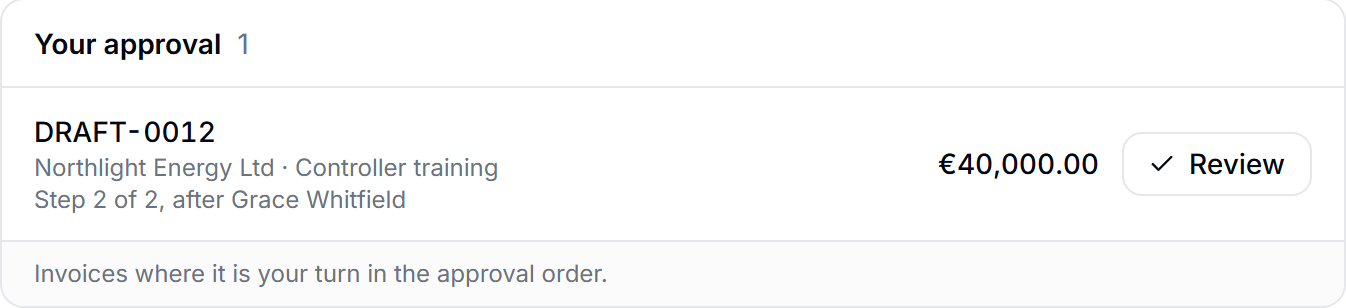

Several currencies
Invoice in the customer's currency, with its own rate on each invoice.
Payments and credit notes
Record full, partial or over payments, and credit a whole invoice or part of it.
Automatic payment reminders
Up to three reminders before and after the due date. They stop when the invoice is paid.
Hourly billing from rates
The draft invoice picks up the hourly rate of each price group. With Costs and rates
Recurring invoices
Send the same invoice to a customer again and again.
Online payment and e-invoicing
A payment link on the invoice, and e-invoices through Peppol.
A cashflow forecast from your billing plans
See the payments you expect week by week and month by month, and find out in time when a payment slips.
Expected payments
What you expect to receive, per week or month, from billing plans and invoices.
Overdue amounts flagged
Payments past their due date are marked in red.
A warning when a payment slips
When an expected payment moves more than your limit in days or percent, the project manager is told.

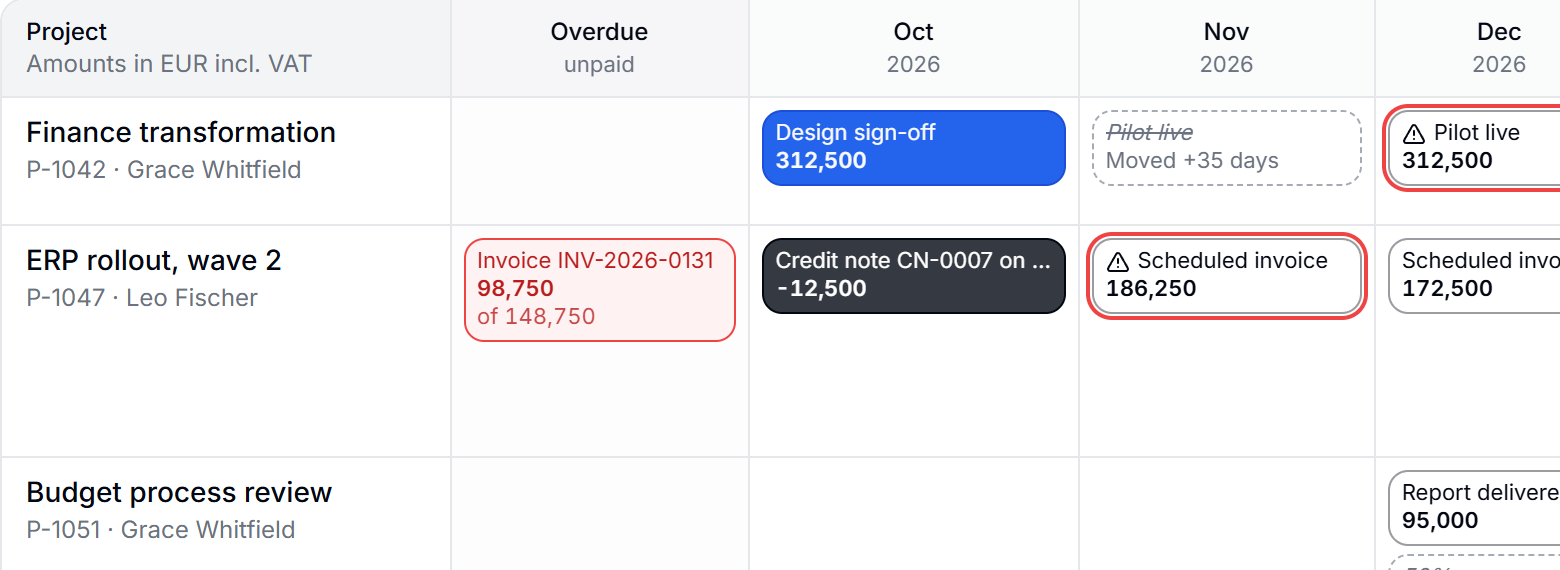
History of every payment
When and why a payment moved, from plan to money in the bank.
Who owns the delay
Every delay is marked as planning, internal or customer.
Costs from registered hours
Registered hours become costs in the forecast at the cost price of the day. With Costs and rates
Bank balance ahead
Your starting balance plus what comes in, minus what goes out, with a warning below your limit.
Scenarios
Switch entries on and off to see what happens to the money.
A risk log with a heat map
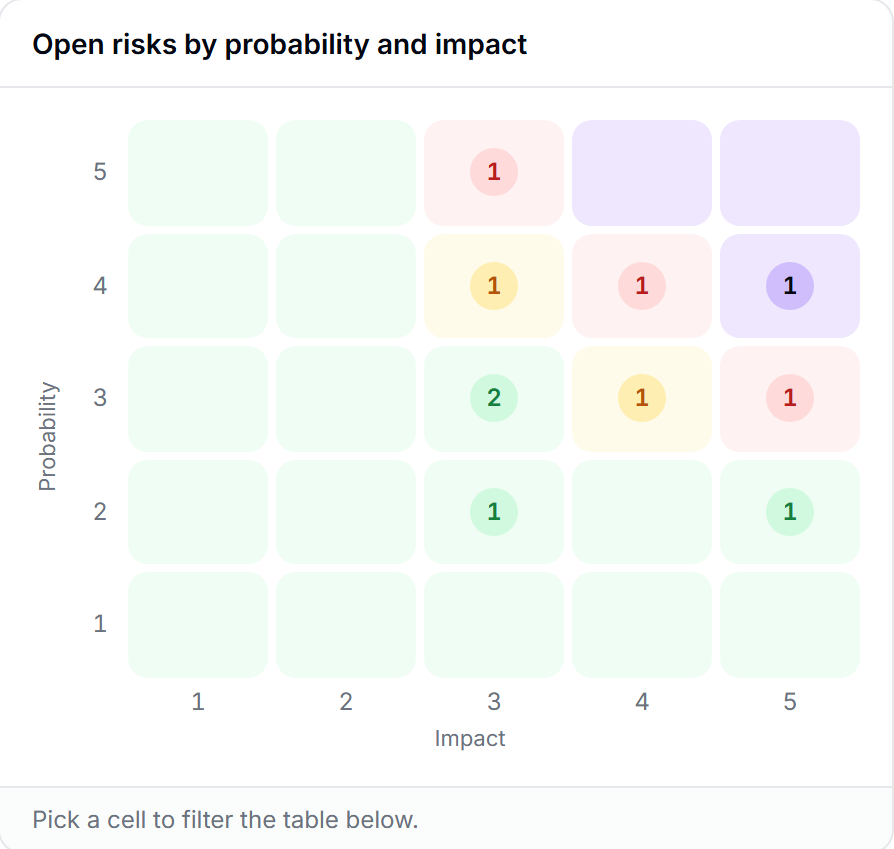
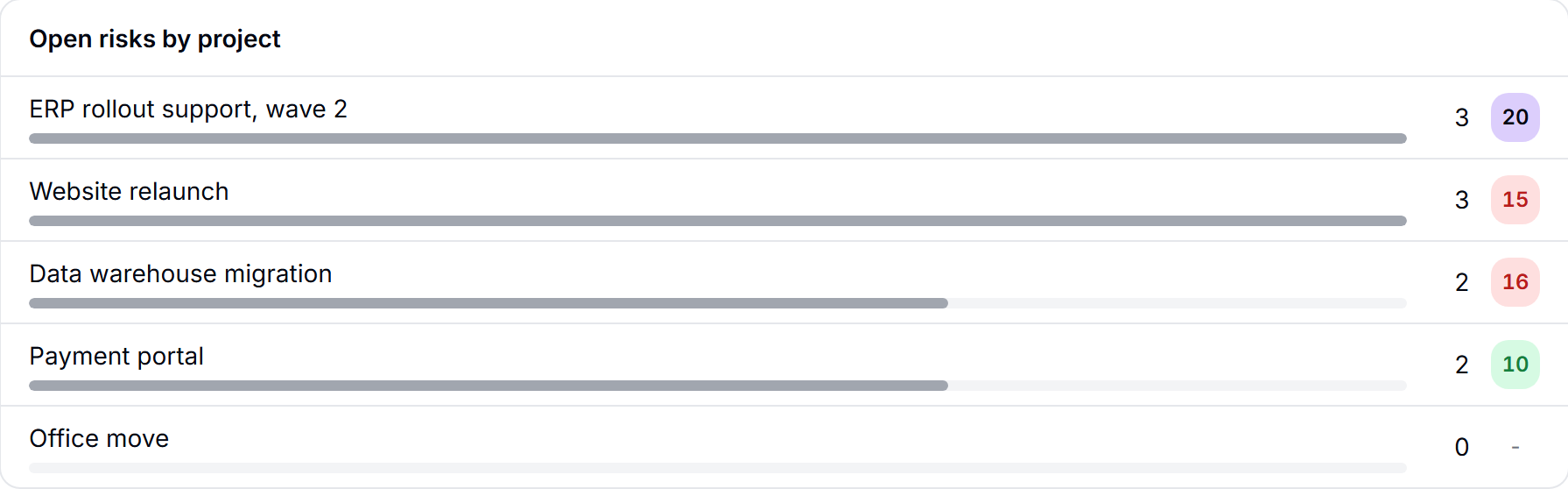
Keep every project risk in one register, with an owner and a plan, and see them all by probability and impact.
Risks with owner and plan
Each risk has a consequence, a category, probability and impact from 1 to 5, an owner, a plan and a status.
Heat map
All risks in a coloured grid. Click a cell to see the risks in it, across projects.
A high risk needs a plan
A high risk cannot be saved without a mitigation plan, and its owner is told.
The customer as risk owner
A customer can own a risk and sees only their own. You choose per project what the customer sees.
Your own levels
Set the limits for low, medium, high and critical.
Actions with owner and deadline
Actions on the risk, each of which can become a task.
Review reminders and history
A date for the next review, and how the risk has moved over time.
From engagement to paid invoice in four steps
Set up the project
Add the customer, the team and the billing plan. Share the status link with the customer.
Plan the work
Create the tasks, give them employees and estimates, and link the ones that depend on each other.
Deliver and register time
The team registers time on tasks in the free Timesheet, and the project shows what is spent and what is left.
Invoice and get paid
The billing plan creates the invoices. After approval they are sent, and reminders follow up until they are paid.
Project management or PSA software?
Project management software plans and follows the work: projects, tasks and deadlines. PSA software (professional services automation) adds what a consulting firm sells and bills: time, resources, invoicing and often sales.
Matrix lets you put that together yourself. Timesheet is free for everyone. Add Project management for the users who run projects, and add Allocation and Resources, Costs and rates or CRM only if you need them.
Use it on its own, or with the rest of Matrix
Project management works without any other paid part. Combined with other parts it does more:
- Hours spent on each project, liveWith Timesheet, free
- Budget, revenue and profit per project, and hourly billingWith Costs and rates
- Book the team on each project and see who is freeWith Allocation and Resources
Pricing
EUR 9.99 per user with access, per month. You pay only for the users who use Project management; everyone else registers time in the free Timesheet. Try it free for 7 days.
See full pricingQuestions about project management in Matrix
Software that plans and follows customer projects from start to finish: tasks and deadlines, the team, the budget, the invoices and the payments. Consulting firms need more than task lists, because the project also has to be billed and paid.
Project management covers the work itself. PSA software also covers time, resources, billing and often sales. In Matrix you get PSA by combining parts: free Timesheet, Project management, and Allocation and Resources or Costs and rates if you need them.
Yes. The billing plan invoices on milestones or at fixed intervals, such as a monthly retainer. Hourly billing from your rates works with the Costs and rates upgrade.
No. Matrix creates, approves and sends invoices as PDF, records payments and credit notes and sends payment reminders. Invoices can also be sent on to your accounting system through Zapier.
Yes. Share a status link where the customer sees the project status without logging in and without being able to change anything.
Yes. Project management works on its own. Timesheet is free for everyone in the firm, so time on projects is there from the start.
EUR 9.99 per user with access, per month. You pay only for the users who use the module. You can try it free for 7 days.
You pay per user who uses it, from one user, and there is no plan to grow into. A firm of five with two project managers pays for two.
Run your next project in Matrix
Start with the free Timesheet, then try Project management for 7 days.
Free. No card needed.